Tech Pack Tool
Document-Centric Workflows to a Connected PLM Ecosystem.
IMPACT
At a glance
This project was an upgrade from manual paperwork to a streamlined process eliminating the manual errors, delays in production deadlines and product delivery.
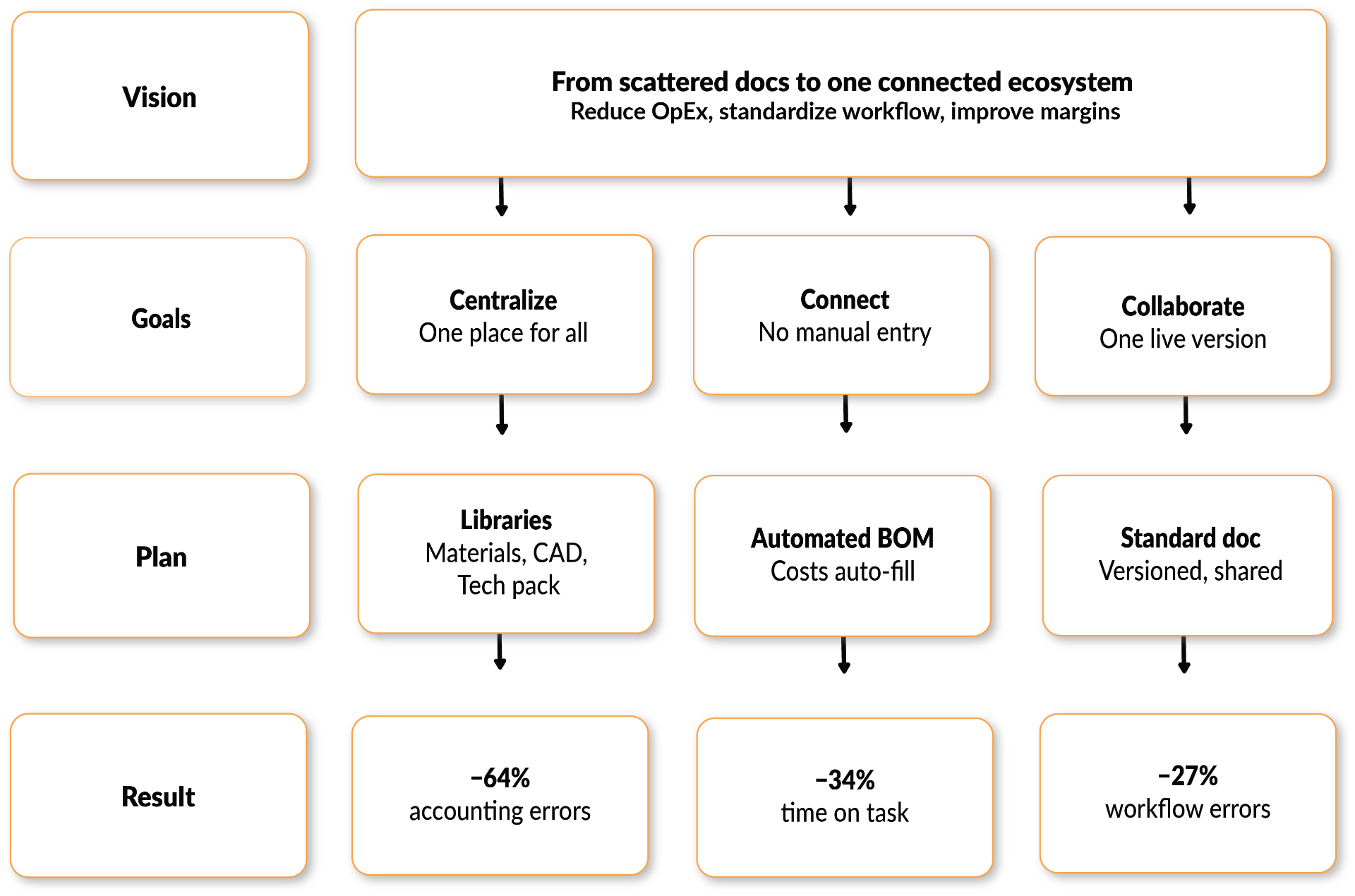
-64% ↓
Reduced calculation mistakes by automation replaced manual entry.
2 → 0
The workflow came in-platform by eliminating tools outside the platform.
-34%↓
Time on Task by using bringing data on the platform.
-27%↓
Workflow Errors went down by standardization and versioning
Role
Lead UI UX Designer
Timeframe
2 Months
Tools
Sketchbook & Pencil, Whiteboard, Adobe XD, Miro,
Tasks Performed
0→1 Design,User Research, UI/UX Design, Component Design,Interaction Design, User Flows, Wire-framing, Prototyping, Usability Testing, Design Handoff, Collaboration with Product, Engineering, and QA teams.
Overview
Context
The GRID is end-to-end supply chain visibility from product conception to distribution with real-time updates and analytics on sourcing, product development, production, and shipping. For companies running their supply chain on Excel sheets and point solutions, the GRID functions as the ERP and as an intuitive supply chain productivity layer. For companies that have legacy PIMs and ERPs, the GRID integrates to connect people, data, and workflows. In either role, the GRID delivers quick time to value by eliminating errors and digitizing manual processes thereby reducing OpEx and COGS and improving margins.
The Problem
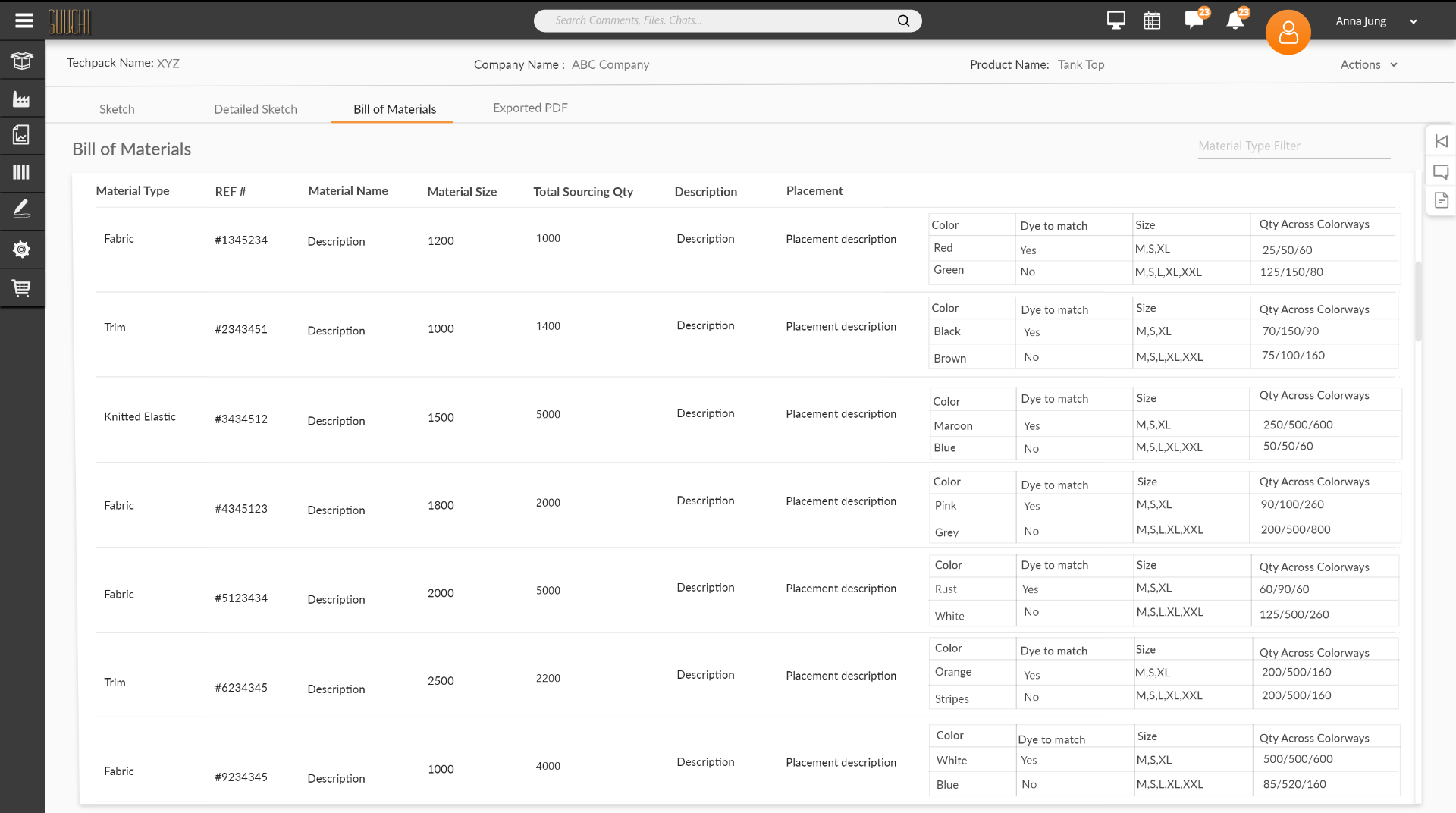
Fashion brands were running product development on disconnected Excel sheets, PDFs, and email threads. Style details, materials, trims, and BOMs lived in separate documents, so any change had to be manually updated across multiple files. Factories were often working from outdated versions, causing production delays, accounting errors, and miscommunication between design, product development, and vendors.
Goal
Research
Stakeholder Interview
After I get a brief from the product team about the new feature and receive the product requirements document (PRD) and competitive analysis, I gain a holistic view of the feature and functionality we are thinking of developing. The stakeholder I interviewed for this feature was the 'Head of Product Development'. It gave me a better understanding of the problem we are trying to solve. As there are many phases and stages in PLM, Product Development Managers were having a hard time managing all the product-related files and data. They had to use multiple tools to manage communication with the factory and the client whenever any change or update was made to the product.
User Interview
Main users of this tool were 'Textile Product Designers' and 'Product Development Managers' who would create styles based on client requirements. With the team moving fast, I chose guerrilla, in-context desk interviews with 5 users — enough signal to direct design without stalling the sprint. I asked them questions specifically targeted to the functionality we wanted to build. Trying to understand what problems are being faced and why & how can we provide the solution for it.
User Interview Insights
"It's difficult to put together all the details about the style in one place as different detail are in different files." - Technical Designer "If there is any change in the style details or material we have to make the change in all the documents/files related to it which is difficult" - Fashion Designer "Every time there are changes we have to keep factories updated with that and provide them the updated project related files" - Product Development Manager "We have to search the material , trims and labels information and pricing and then add their price manually to the document/files " - Product Development Manager
Survey
I ran a short survey with fashion designers and product developers to understand how they currently build and manage tech packs. The survey informed the decision to develop this feature as part of the UX Strategy. The responses clarified the biggest pain points, the tools in use, and where a dedicated platform could save the most time.
Personas
Product Development Manager
- Manage end-to-end product lifecycle from design to production
- Coordinate between design, client, and manufacturing teams
- Track changes and maintain version control across all documents
Technical / Fashion Designer
- Create detailed sketches and CAD designs efficiently
- Organize materials, trims, and labels in one place
- Communicate design changes to stakeholders seamlessly
Client
- Review and approve designs and techpacks in real time
- Request changes and provide feedback directly on documents
- Stay informed about production progress and updates
Manufacturing Factory User
- Receive complete and accurate techpacks for production
- Access BOMs, material specs, and design details easily
- Clarify requirements and communicate back to the brand
Strategy
Vision
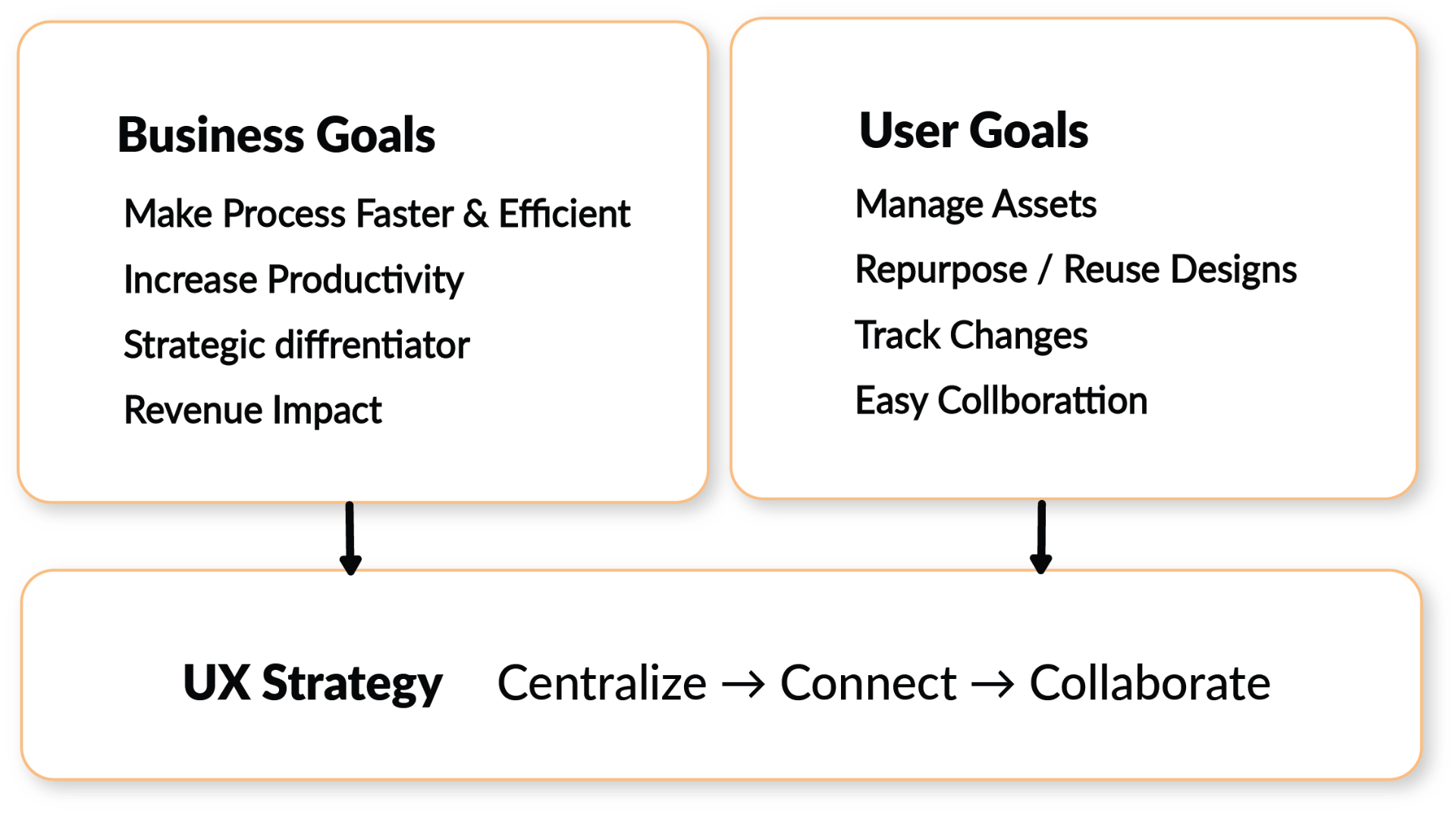
Building an efficient and automated PLM ecosystem that reduces operational expenses, builds standardized workflows, and improves margins.
Goals
| User Goals | Business Goals | Expected Result |
|---|---|---|
| Stop hunting for details across scattered files. | Reduce rework and manual error/data entry | Lower accounting errors, automation |
| Change something once, not in ten documents. | Cut cycle time. | Reduced time on task, automation |
| Keep clients/factories current in real time. | Real-time collaboration, communication & updates | Increased speed & workflow efficiency |
| Repurpose & reuse existing designs (CAD, tech pack files) | Reduce OpEx and time. | Increased speed, reduced expenses |
| Track all changes easily | Provide transparency and traceability in PLM | Trust, User satisfaction |
| Share finalized product documents with factories and clients | Standardize the process | User satisfaction, Client retention |
| Modify CAD and tech pack files in the platform | Users don't leave the platform, Differentiator from the competitors | Time spent on the platform, retain & attract new clients |
Plan
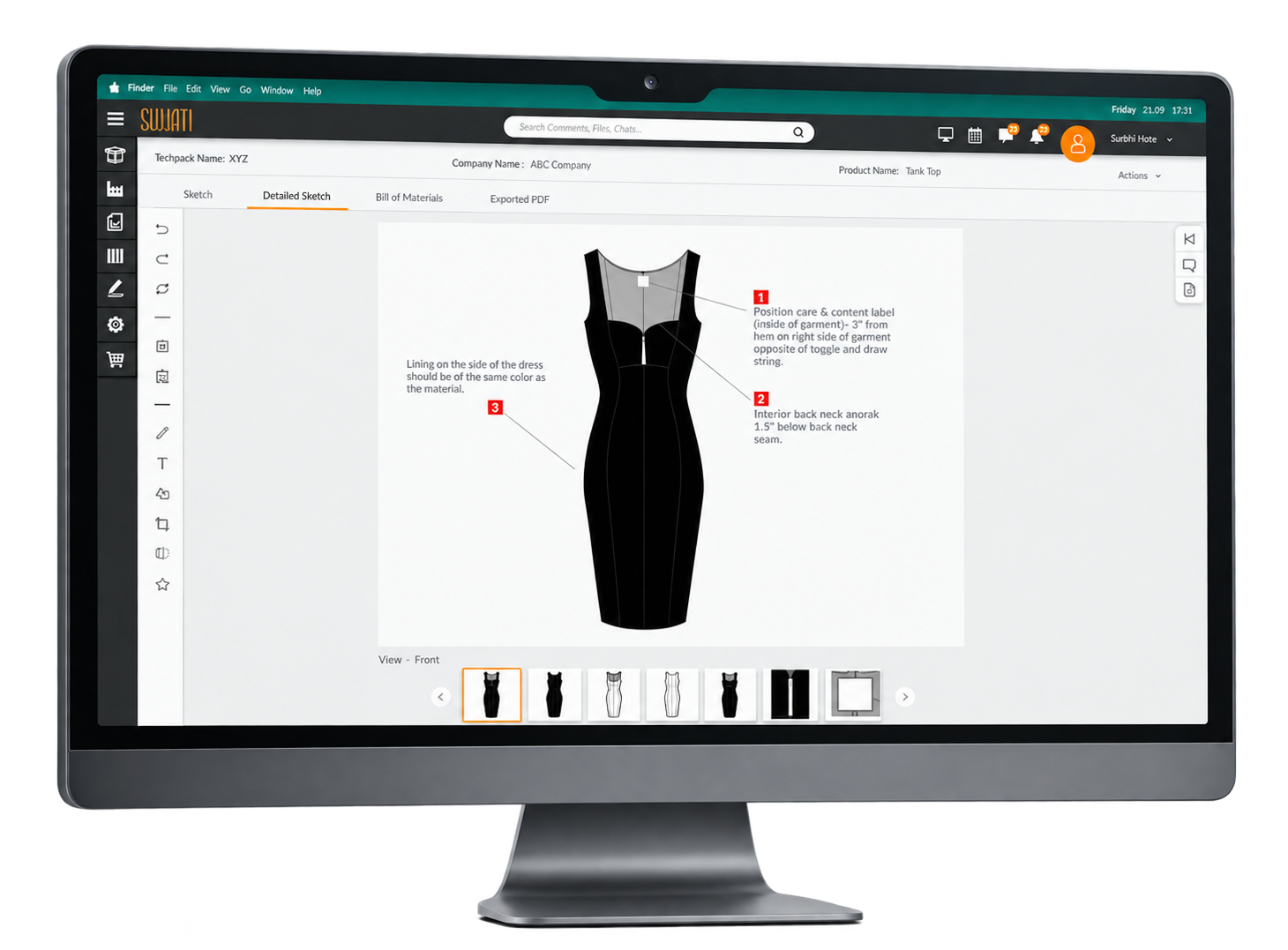
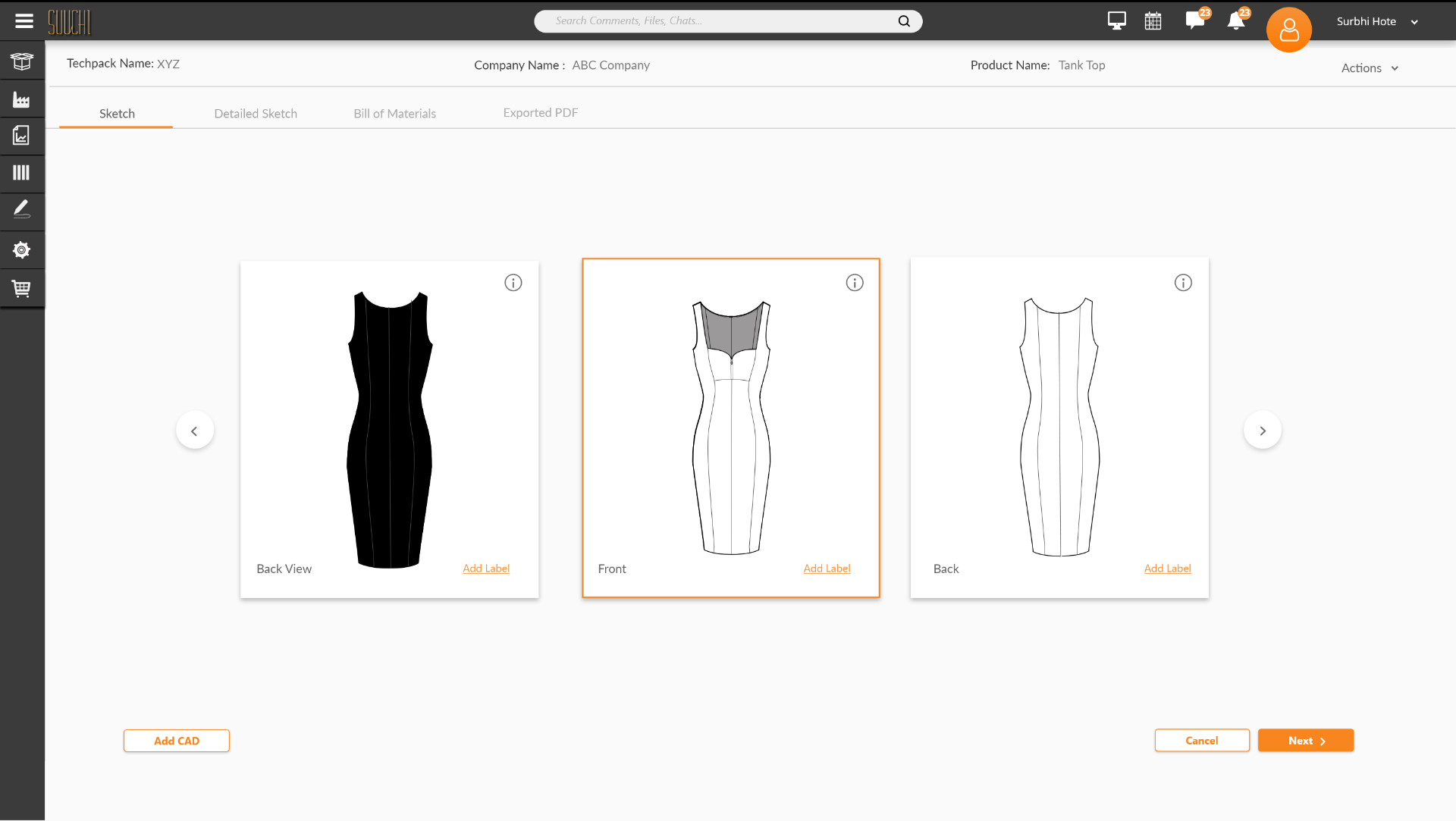
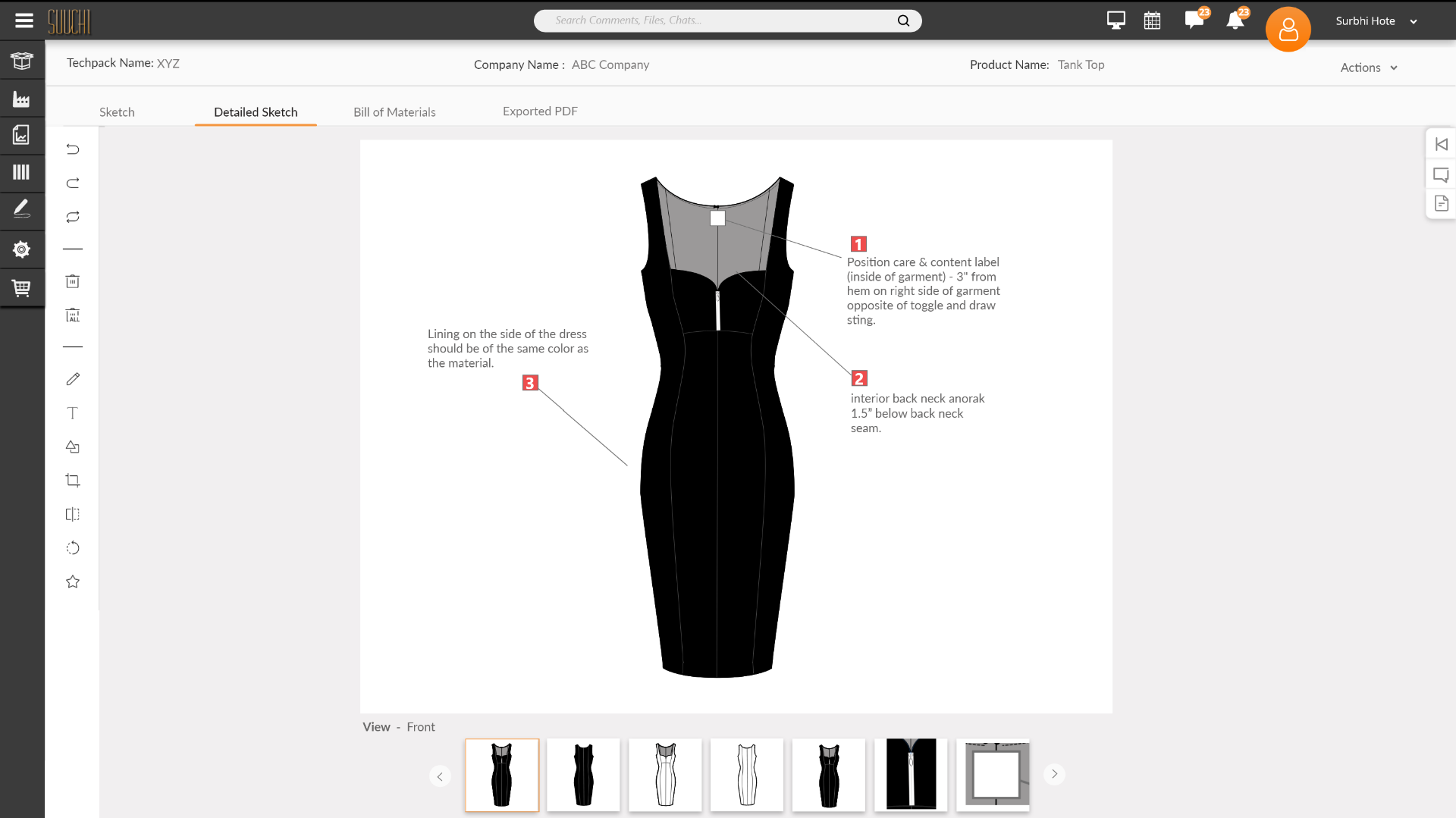
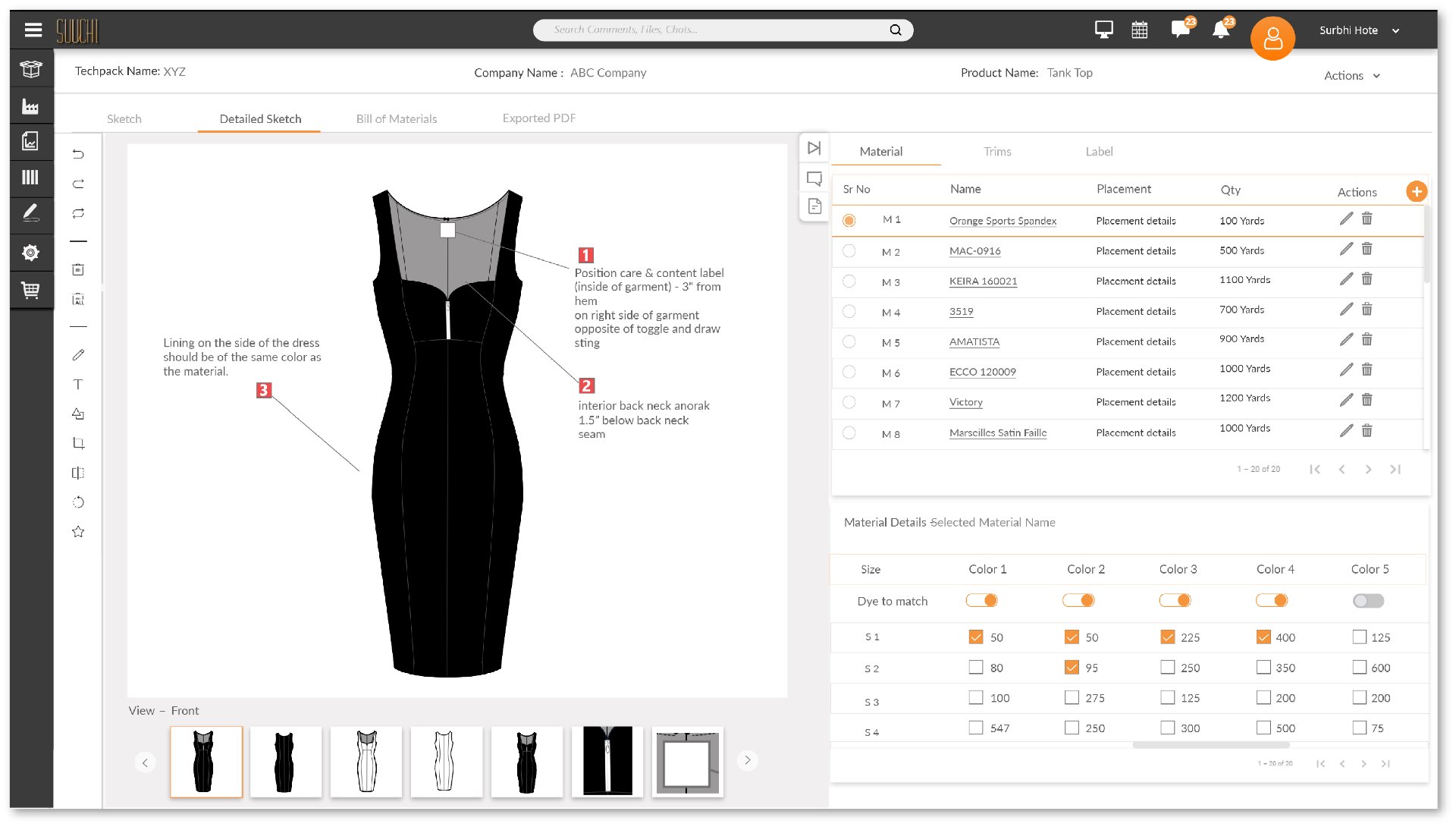
1. Centralize Building Libraries (Quick Win) - To show the collection of all the Tech Pack and CAD files which get added to individual products already available on the platform, Build the Material & Trims library so it can be added to products directly and eliminate related manual data entry and paperwork. 2. Connect Automation - Transition from pre-production to production stage came with a lot of manual work entering the material and trims details manually. In addition to that, you have to add the costs for the product and create a bill of materials, which was a time-consuming task and calculation errors occurred frequently. Connecting all the different parts of the platform to talk to each other and connect the workflow from pre-production to production stage, enabling ease of handling the process, documents, cost sheet, changes in product, and collaboration with clients, factories, and internally to make the workflow better and efficient. 3. Collaboration Standardization - Bridge the gap between pre-production and production stage of a product lifecycle. There is a need for a standardized document that will contain all the details of the product, like designs, materials, trims, and detailed instructions, which can be sent to the manufacturing factory. If there are modifications to the details, then a new version of the document will be created and sent to the factories, making it easier to track changes and communicate them to the factories. Design ran ahead of engineering. Each work stream was researched, designed, and reviewed to sign-off, then handed to development and while it was being built, I designed the next one. The eight weeks below are a single pipeline, not sequential phases; design and build overlap throughout.Following is the Build & release sequence.
Design
Initial sketch
I procured the different files that the Fashion Designer/PDM used to send to the clients and the factory.
- Bill of Material (Material and trims costing file)
- Final CAD file
- Tech Pack file
- Fabric & Trims Catalogue
To understand the details to get started with the initial sketches and get some inputs from users.
Brainstorming Session With Product Team
I presented my sketches to the product team using a whiteboard, as the possible solution for the feature we were building. After the feedback and discussion about the design requirements from an engineering standpoint, the concept design was good enough to kickstart the mid-fidelity wireframes and gather some user feedback.
Low Fidelity Wireframes
Creating low fidelity wireframes helps me focus on the visual consistency and hierarchy before applying styles. In these wireframes, I tried to incorporate common design patterns that have been tested on our competitors' product, or included elements that directly address users' goals, needs, and frustrations. Once I had a visual direction of the layout, I started to add more details and precisions to the sketches by turning them into mid-fidelity wireframes.
Workflow
User flow
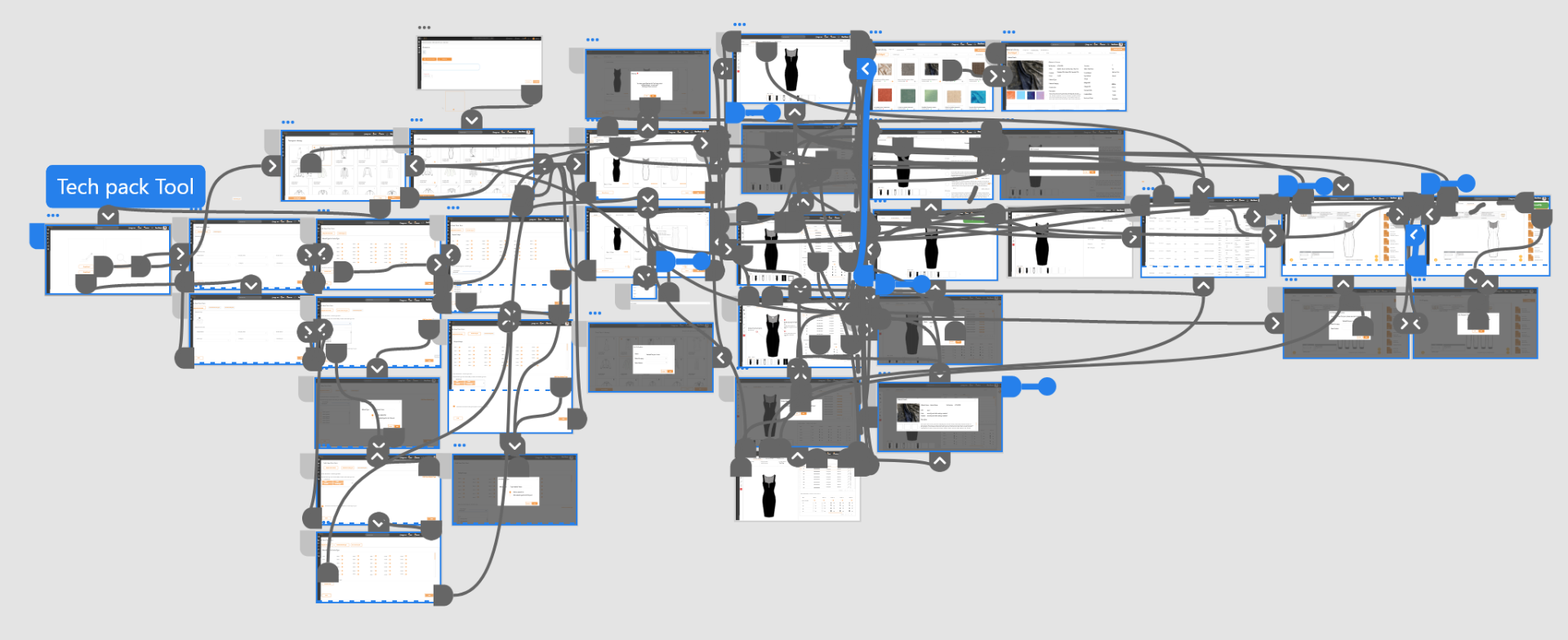
To decide what I am designing, identifying the main flow of users when completing a task helps me to direct my focus on designing specific pages. By creating task flows that center on key functions of the Design studio , I was able to think through the necessary steps and examine the user experience in detail. Below is the flow showing the various places from which you can start and access the design studio and edit the Tech Pack.
Review with Users, Product & Engineering Team
- Reviewed the initial low-fidelity clickable wireframes with users to gather feedback on functionality and usability. After observing how they interacted with the wireframes and noting what could be added, I created a second iteration and shared it with them again.
- After the second iteration, I reviewed the wireframes with the VP of Product to confirm they met all requirements. I communicated user needs and observations from interviews — including items I had added that were not in the product requirements document — and updated the team to keep Engineering in the loop.
- To confirm technical feasibility and software architecture, and to understand the development effort and time required, I reviewed the designs with the CTO and received engineering feedback and inputs for improvement.
- I reviewed designs with the developers and confirmed the new UI components I would need for this feature, whether they could build them, and the effort and time required.
- After taking inputs from users, Product, and Engineering, I started putting together high-fidelity wireframes to improve the design in a third iteration.
Testing
Usability Testing
- As testing started from the early stage with the initial wireframes, It was quite helpful in finding user needs and expectations and setting up for the right direction for design to fill the gaps in the functionality. I recruited 5 participants to test the prototype.
- I divided functionality into 6 different tasks to check the task completion rate and time required to complete those tasks Usability test questions .
- Usability Test Findings
- Based on the test result data some changes were made to fix issues faced by the users.
Solution
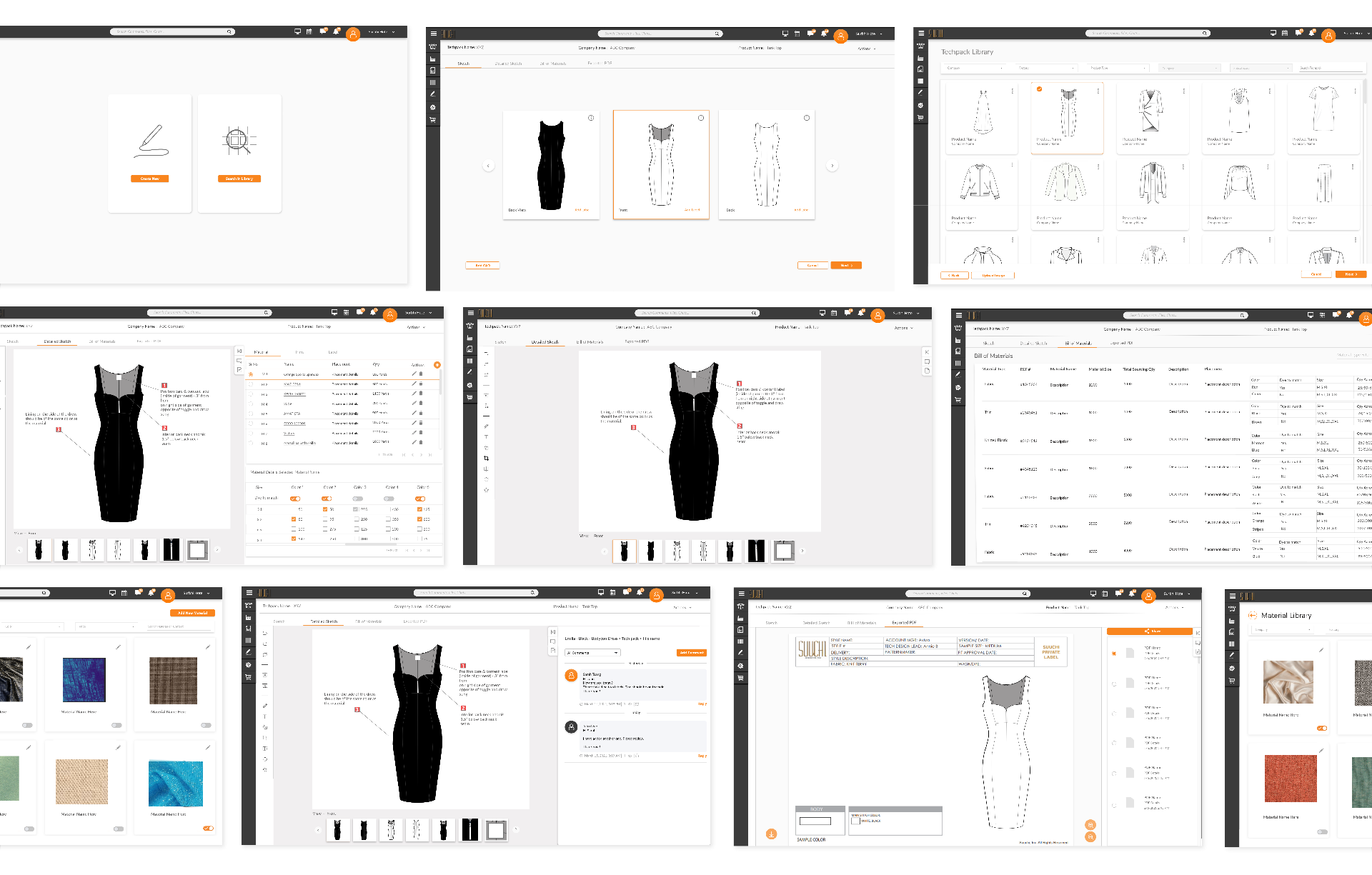
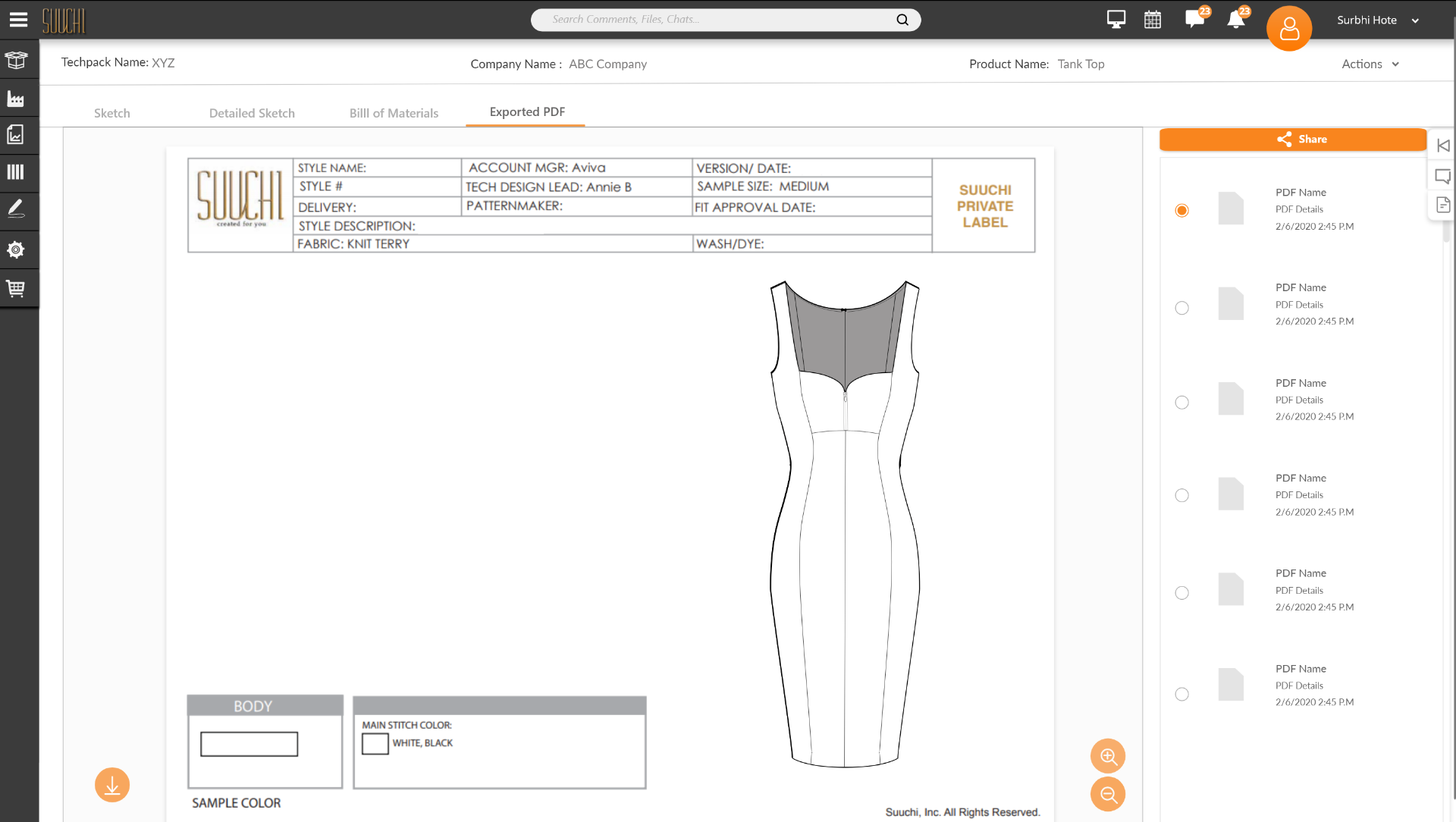
Reflection
This was a big project and turned out to be a good selling point for the company. Apart from that, it was a great workflow improvement, which eliminated accounting errors that happen due to manual workflow. Thanks to the libraries built, it sped up the workflow through reuse and repurposing. Because of the editor tool, users didn't have to go outside the platform to do all the editing for the manufacturing phase. Overall, the project was a great success.